HTML Code Color
Enregistrer, Remplir les champs vides, Imprimer, Terminer!
How do you color text in HTML? What is HTML color code? How do I get the HTML color code? Download these Hex Color Codes and other colors.
Formats de fichiers gratuits disponibles:
.docx- Ce document a été certifié par un professionnel
- 100% personnalisable

Life Privé Internet l'Internet IT TI Html html color code code couleur html html color picker sélecteur de couleurs html html code color sample html code color sheet color codes html color code template html code color examples html code color sheet template html sheet html color picker image yellow color code green color code red color code
How do you color text in HTML? What is HTML color code? How do I get the color code from color?
Here is an expanded and comprehensive version of your text that answers all your questions while fleshing out the concepts for your readers.
The Complete Guide to HTML Colors
Whether you are designing a website from scratch or tweaking an existing template, understanding how colors work on the web is essential. Here is a breakdown of how HTML color codes work, how to find them, and how to apply them to your text.
What is an HTML Color Code?
An HTML color code is a specific identifier that tells a web browser exactly which color to display. Because browsers can't understand vague terms like "ocean blue" or "sunset orange," we use specific mathematical values to represent the exact shade.
Every color that you view on your screen is created by mixing red, green, and blue light. Because of this, every color has a Hexadecimal (Hex) Code and an RGB Equivalent:
- Hex Codes: A six-digit alphanumeric code preceded by a hashtag (e.g., #FF0000). The first two characters represent red, the middle two represent green, and the last two represent blue.
- RGB Codes: Stands for Red, Green, and Blue. It dictates the intensity of each light source on a scale from 0 to 255.Here are a few common examples:
Color Hex Code RGB Equivalent
Red #FF0000 RGB(255, 0, 0)
Blue #0000FF RGB(0, 0, 255)
Green #008000 RGB(0, 128, 0)
Black #000000 RGB(0, 0, 0)
White #FFFFFF RGB(255, 255, 255)
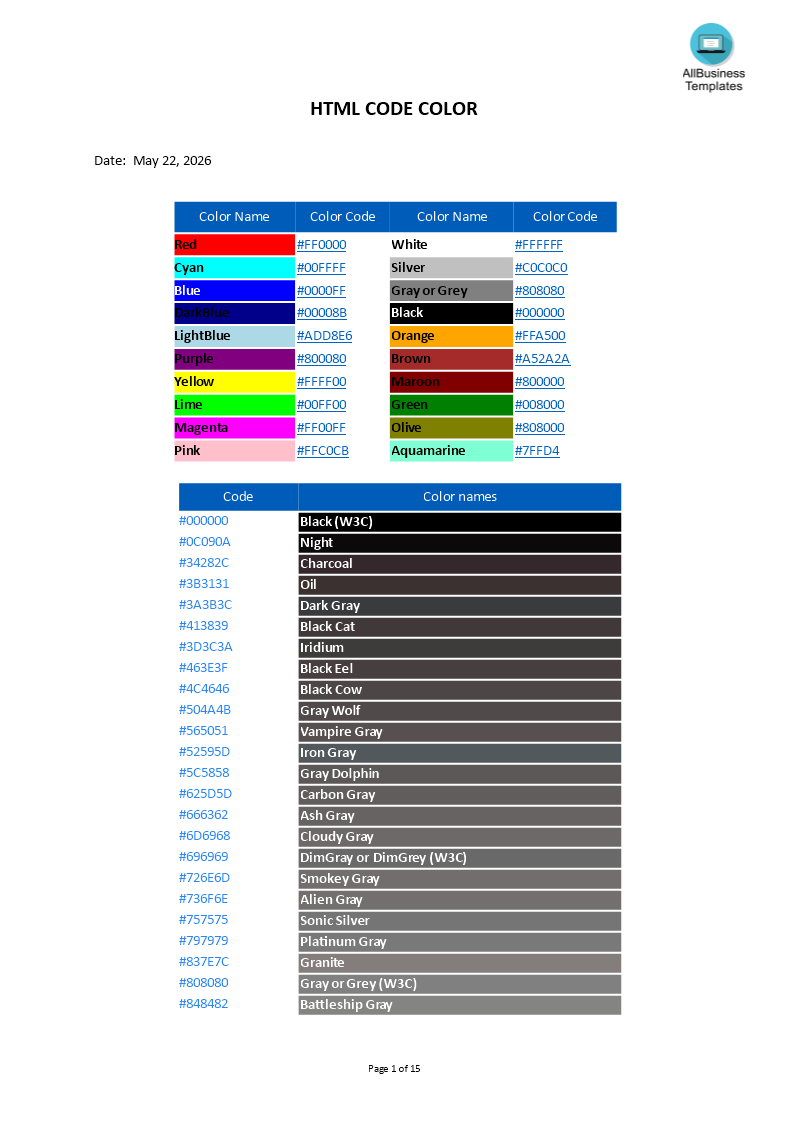
If you need a clear overview of colors and their respective color codes, make sure you check out this chart.
How to Color Text in HTML?
In modern web design, we use CSS (Cascading Style Sheets) to change text color. The old HTML method (using the tag) is deprecated and no longer recommended.You can apply color to your text using the style attribute directly within your HTML tags (known as inline styling).
You simply use the color property followed by your chosen color code.Example using a Hex Code:HTML<p style="color: #FF0000;">This text will be bright red.</p>
Example using an RGB Code:HTML<p style="color: rgb(0, 0, 255);">This text will be bright blue.</p>
Example using a standard Color Name:(Browsers recognize 140 standard color names)HTML<p style="color: green;">This text will be green.</p>
How Do I Get the Color Code from a Color?
If you see a color you love on a website or an image and want to use it, you don't have to guess the code. You can extract it easily using a few methods:
- Browser Developer Tools: Right-click on any webpage element and select "Inspect". Look at the CSS styles panel on the right side of your screen. You will usually see a small colored square next to the hex code. Clicking that square often opens an eyedropper tool that lets you click anywhere on the page to steal a color.
- Browser Extensions: There are hundreds of free "Color Picker" or "Eyedropper" extensions for Chrome, Safari, and Firefox. Once installed, you simply click the extension, point at a color on your screen, and it copies the Hex/RGB code to your clipboard.
- Search Engine Color Pickers: If you just want to play around to find a nice shade, simply Google the phrase "Color Picker." Google provides an interactive slider right in the search results that generates the exact Hex and RGB codes for whatever shade you choose.
- Design Software: Programs like Photoshop, Canva, or Figma all have eyedropper tools that will instantly display the Hex code of any pixel you click on.
If you need a clear overview of colors, their respectable color codes, and how they pair together, it helps to keep a cheat sheet handy.
Download this HTML Color Code Chart template for your reference. This chart includes web-safe colors, popular palettes, and both Hex and RGB values so you can easily copy and paste them directly into your project.
Download this HTML Color Code Chart template for your reference.
AVERTISSEMENT
Rien sur ce site ne doit être considéré comme un avis juridique et aucune relation avocat-client n'est établie.
Si vous avez des questions ou des commentaires, n'hésitez pas à les poster ci-dessous.