Video Script Template
Opslaan, invullen, afdrukken, klaar!
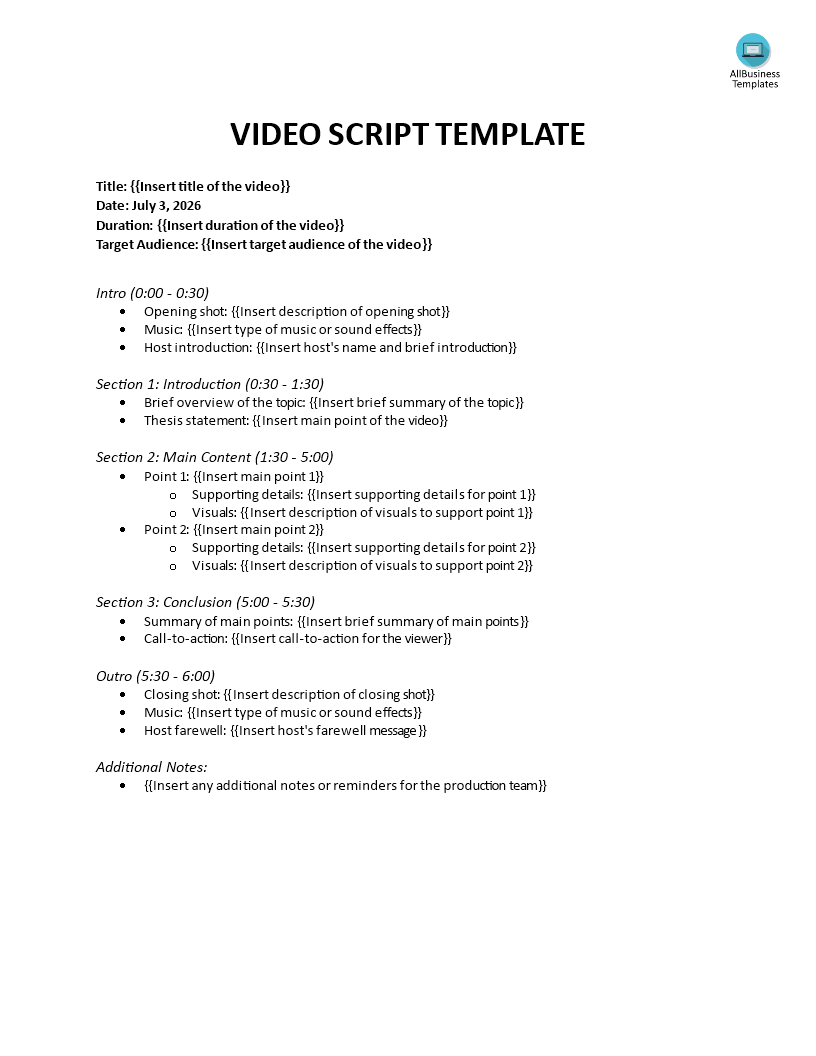
Are you wondering how to write a video script template that effectively structures your content from start to finish? Download this Audio-Visual Video script template now.
Beschikbare bestandsformaten:
.docx- Gevalideerd door een professional
- 100% aanpasbaar
- Taal: English
- Digitale download (30.03 kB)
- Na betaling ontvangt u direct de download link
- We raden aan dit bestand op uw computer te downloaden.
If you want to create compelling, high-quality videos without the stress of an unorganized production, you are in the right place. Are you wondering how to write a video script template that effectively structures your content from start to finish?
Whether you are looking for a free script template for a tutorial video recording or a highly adaptable YouTube video script template, creating engaging content begins with a solid plan.
Our comprehensive video script template is designed to streamline your entire creative process. It is highly versatile and can easily be formatted as a video script template in Google Docs file for seamless team collaboration. Working on a different type of project? You can easily adjust the timestamps to create a punchy 60-second video script template, or focus heavily on the audio cues to use it as a music video script template.
Here is a step-by-step guide on how the video script template creation works using our structured layout to ensure your production is a success:
1. Define Your Foundation
Before writing the dialogue, fill out the metadata at the top of the template. Clearly define your Title, Duration, and Target Audience. Knowing exactly who you are talking to dictates the tone, pacing, and vocabulary you should use throughout the video.
2. Craft a Strong Intro
The first 30 seconds are crucial for hooking your viewer. Plan your opening shot, audio cues, and host introduction. Then, from 0:30 to 1:30, transition into a brief overview of the topic and provide a clear thesis statement so your audience knows exactly what value they are getting.
3. Map Out the Main Content
This section is the core of your video. Break your main message down into clear, digestible points. For each point, outline the supporting details (what will be said) and pair them directly with specific visuals (what will be seen on screen) to keep the viewer engaged.
4. Conclude and Call to Action
As your video winds down, summarize your main points to reinforce your message. Most importantly, deliver a strong call-to-action (CTA) telling the viewer exactly what they should do next (e.g., subscribe, click a link, or buy a product).
5. Plan the Outro and Notes
Finish professionally with a planned closing shot, outro music, and a host farewell message. Finally, utilize the "Additional Notes" section at the very bottom to leave essential reminders for your production team, camera operators, or editors to ensure nothing is missed during filming.
Stop winging your video production efforts and start creating content like a pro. Download our easy-to-use template today and bring your vision to life!
DISCLAIMER
Hoewel all content met de grootste zorg is gecreërd, kan niets op deze pagina direct worden aangenomen als juridisch advies, noch is er een advocaat-client relatie van toepassing.
Laat een antwoord achter. Als u nog vragen of opmerkingen hebt, kunt u deze hieronder plaatsen.