Project Status Report Excel template
Sponsored Link高级模板 保存,填空,打印,三步搞定!
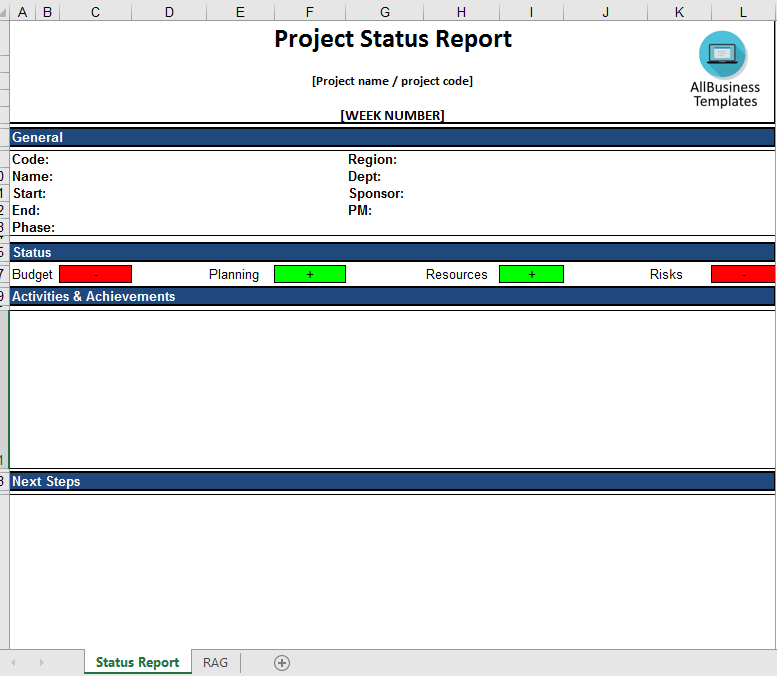
下载 下载 Looking for a simple way to collect project results? Check out this report. It is free from any protection and can easily be edited to your needs.
只有今天: USD 2.99
点击购买


可用的免费文件格式:
微软电子表格 (.xlsx)- 本文档已通过专业认证
- 100%可定制
- 这是一个数字下载 (28.88 kB)
- 语: English
- 付款完成后,您将收到包含该文件的电子邮件。
Sponsored Link
Looking for a simple way to collect project results?
Are you searching for an easy and efficient way to gather project updates from your project managers—without relying on complex or overpriced software? Want a solution you can start using today?
A project status report is a structured document that provides timely updates on the progress of ongoing projects. It is designed to answer the key questions that management and stakeholders typically have—often before they even need to ask. By presenting relevant insights clearly and consistently, these reports help keep everyone aligned and informed.
How to use Project Status Reports effectively?
Project status reports are one of the most important communication tools between project managers, sponsors, boards, and stakeholders. They are usually prepared regularly—weekly, biweekly, monthly, or at key project milestones.
The effectiveness of these reports depends largely on clarity and focus. A good project status report should:
- Be concise and easy to understand
- Highlight key information rather than overwhelming details
- Provide a clear snapshot of the project’s current state
The responsibility lies with the project manager to deliver reports that are structured, insightful, and accessible to both technical and non-technical audiences.
Why Project Status Reports matter?
An effective project status report provides management with a clear overview of project health and progress. It enables informed decision-making and serves as a natural checkpoint for alignment and approval.
Well-prepared reports typically cover:
- Progress against the timeline and milestones
- Budget status and resource allocation
- Work completed and upcoming tasks
- Risks, issues, and mitigation actions
- Overall project performance in terms of time, cost, and quality
By offering transparency and early visibility into potential challenges, these reports help organizations stay in control and avoid surprises.
A simple, ready-to-use Excel solution
To help you save time and standardize reporting, we offer a practical and easy-to-use Excel Project Status Report template. It allows your project managers to report consistently—regardless of the project management methodology used, such as PRINCE2, Agile, or Scrum.
This template provides a clear, summarized overview of all critical project aspects, enabling you to quickly assess performance and prioritize actions to keep projects aligned with your business objectives.
What’s included in the PM template?
The Excel template covers all essential reporting elements, including:
- Project name
- Client name
- Reporting date
- Project scope
- Current project status
- Completed work
- Current and upcoming tasks
- Identified issues
- Key delivery dates (past, current, and planned)
- Important notes and comments
- Budget overview
- Planning and timelines
- Planned vs. actual milestones
- Risks and mitigation actions
- Results and progress updates
- Comments and observations
- RAG (Red-Amber-Green) status indicator
- Get started in minutes
This fully editable template is free from restrictions and can be easily customized to fit your specific needs. Simply download, adjust the content and layout, and start using it right away.
Streamline your reporting process, improve communication, and gain better control over your projects—without unnecessary complexity.
DISCLAIMER
Nothing on this site shall be considered legal advice and no attorney-client relationship is established.
发表评论。 如果您有任何问题或意见,请随时在下面发布

相关文件
Sponsored Link
