Claude AI Prompts template
Save, fill-In The Blanks, Print, Done!
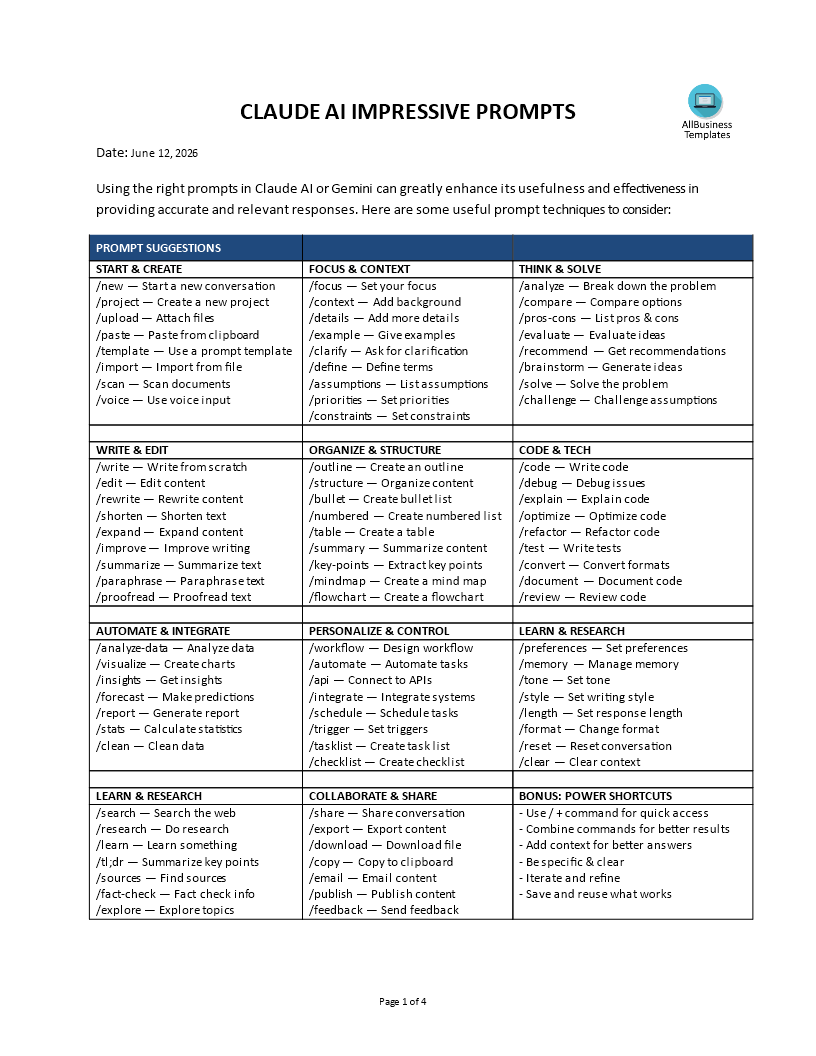
Download Claude AI Prompts template
Microsoft Word (.docx)Or select the format you want and we convert it for you for free:
- This Document Has Been Certified by a Professional
- 100% customizable
- This is a digital download (54.37 kB)
- Language: English
- We recommend downloading this file onto your computer.
How to write a prompt for Claude AI?
Getting the exact output you want from Claude shouldn't feel like a guessing game. The secret to skipping the trial-and-error phase isn't just typing longer sentences—it is using a structured framework.
Think of Claude as a brilliant, deeply analytical assistant. While Claude excels at nuance, giving it a vague request will still result in a generic answer. When you use a standardized system of command shortcuts, you instantly unlock highly accurate, executive-level results.
By categorizing your commands—from setting your initial background context to running advanced data analysis—you can seamlessly guide Claude through every stage of your project without rewriting your instructions from scratch.
Below is the ultimate cheat sheet of power commands designed to help you organize your thoughts, control Claude's persona, and draft the perfect prompt every single time.
Ultimate Claude Prompting Command Matrix Core Workflows
- Start & Create: Initialize projects, upload source files, or apply template frameworks.
- Focus & Context: Define bounds, leverage Claude's long context window, and set strict guardrails.
- Think & Solve: Force deep critical thinking, step-by-step reasoning, and strategic breakdown.
- Write & Edit: Polish tone, manipulate copy, adjust length, or summarize complex text.
- Organize & Structure: Turn raw walls of text into clean markdown tables, bullet points, or structured outlines.
Specialized Technical & Personal Control
- Code & Tech: Generate clean code, debug issues, refactor logic, or document complex repositories.Data & Analysis: Extract deep quantitative insights, parse charts, and clean raw datasets.
- Automate & Integrate: Map out workflow logic, draft system prompts, and build structural checklists.
- Personalize & Control: Hardcode your specific target audience, brand voice, preferences, and output formats.
- Learn & Research: Deep dive into dense topics, summarize lengthy academic papers ($tl;dr$), and fact-check information.
- Collaborate & Share: Safely package, export, and clean your successfully engineered prompts.How to Optimize Your Prompts for Claude
Whether you are using Claude for academic research, thesis writing, corporate workflows, or creative content creation, mastering specialized prompt structures will vastly improve your daily output.
This comprehensive framework is perfectly optimized to help Claude excel across a wide variety of advanced use cases:
Academic & Thesis Writing: Structural breakdown, citations, and literature reviews.
Storytelling & Video Scripts: Dynamic pacing, narrative hooks, and engaging YouTube scripts.Step-by-Step Execution: Creating standard operating procedures (SOPs) and product launch plans.
Deep Analysis: Clarifications, comparative tables, complex explanations, and balanced pros & cons lists.
Strategic Consulting: Problem-solving frameworks, structural analogies, and strategic recommendations.Content Refinement: Audience personalization, stylistic adjectives, rephrasing, and follow-up adjustments.
Pro-Tip for the Claude Interface: When entering your prompt, remember that Claude reads everything in order. If you want to insert a line break or separate your instructions from your data source, press "Shift + Enter".
PRO-TIP FOR COMBINING COMMANDS: Don't use these commands in isolation! For maximum efficiency, chain your logic together inside your prompt window. For example:[Paste your source text here] /context (B2B SaaS Audience) /tone (Empathetic but direct) /tableReady to Master Prompt Engineering?Stop guessing what the AI needs to hear. Keep this framework directly at your fingertips to eliminate prompt fatigue, cut down your editing time, and professionalize your AI workflows instantly.
Download the Full Claude AI Prompting Cheat Sheet PDF Now!
DISCLAIMER
Nothing on this site shall be considered legal advice and no attorney-client relationship is established.
Leave a Reply. If you have any questions or remarks, feel free to post them below.

Other templates
Latest templates
Latest topics
- AI Cheat Sheet
How to Prompt Perfectly? Check out this 11 Essential AI Prompting Cheat Sheet, the Ultimate AI Prompt Engineering Guide! - How To Buy Akiya Japan?
How To Buy Akiya Japan? From Starting Your Search To Hosting Your Guests... - Top Hotel Templates
Are you looking for effective strategic, tactical and operational hotel templates to improve your hotels' efficiency and effectiveness? These easy to amend hotel templates can help you out! - How to train for a Marathon?
These tips and best practices are written for those who wants to succeed in finishing a half or full marathon! if you are a pro or amateur, this information is suitable for you! - Halloween Templates
Browse throug these free Halloween templates and use them for your party or event! If you are looking for the funniest, craziest Halloween stencils and templates, look no further!
cheese
